Small Caps: When to Use Them and How to Set Them Properly
- Maria
- Typography
- 23 Oct, 2026
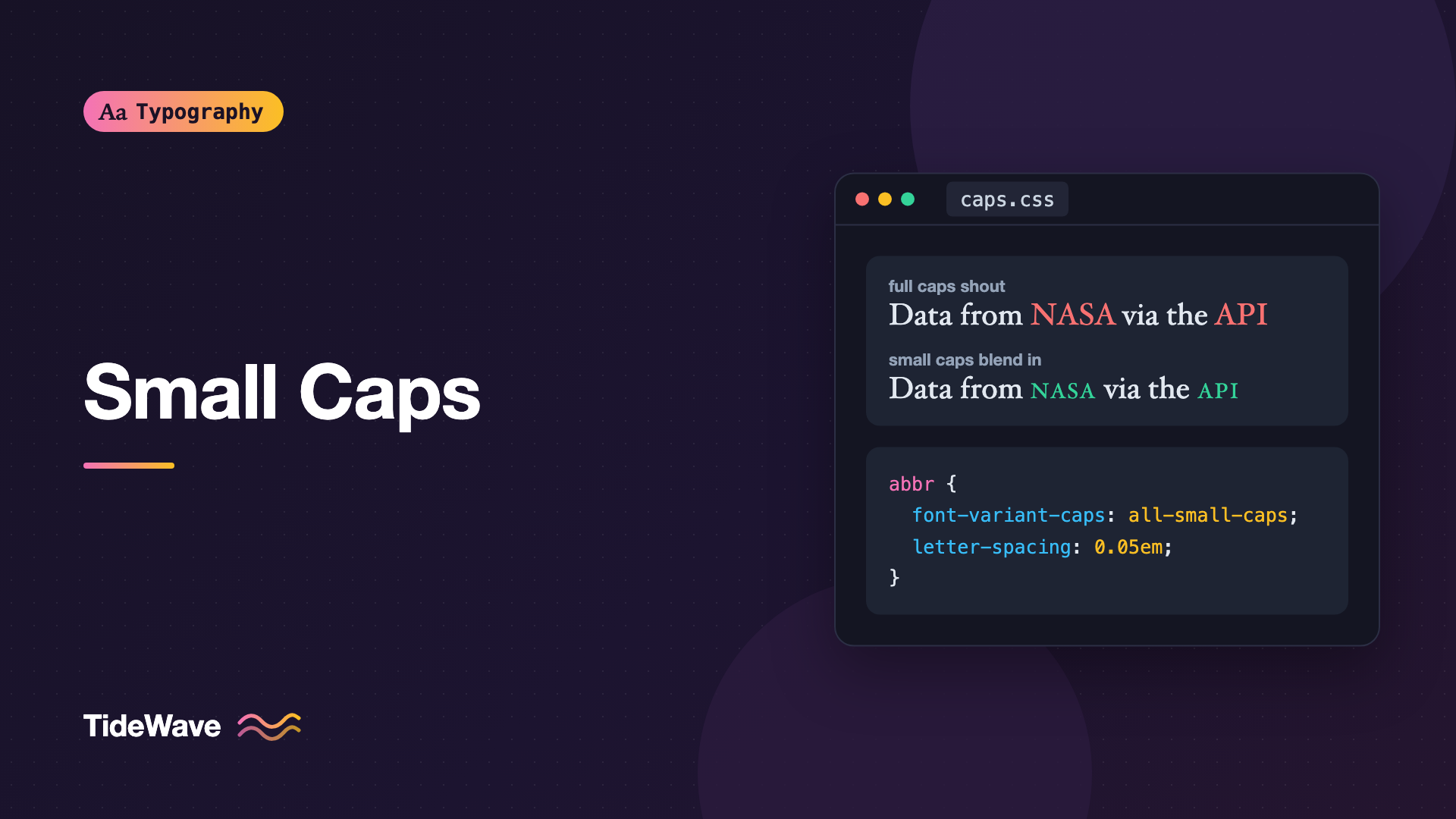
Read a paragraph full of acronyms like NASA, HTML, CSS, and API, and you'll notice how loud they are. Each one is a block of full-height capitals that pulls the eye away from the surrounding lowercase text, as if every acronym were shouting. Book designers solved this long ago by setting such words in small caps: capital letterforms drawn at roughly the height of lowercase letters, so they sit calmly in a line of text.
Small caps are one of the most useful refinements in typography, and also one of the most commonly faked. The browser can produce something that looks like small caps from any font, but the result is usually thin, spindly, and badly spaced. Real small caps come from glyphs the type designer drew specifically for the job.
This guide explains what small caps are, where they work well, how to set them correctly in CSS, and how to tell real small caps from fake ones.
What Small Caps Are
A small cap is an uppercase letterform reduced to about the height of the font's lowercase x-height, or slightly taller. In a well-made font, small caps aren't just shrunken capitals. They're drawn separately with:
- Heavier strokes, so they match the weight of lowercase letters rather than looking thin.
- Slightly wider proportions, for better legibility at a small size.
- Looser spacing, since small letters need more room between them to read clearly.
Compare that with simply scaling down full-size capitals. Every stroke shrinks along with the letter, so a scaled capital at 70% of the size has strokes 70% as thick. Next to regular lowercase text, it looks pale and cramped. That's the difference between true and synthesized small caps.
Petite Caps
Some fonts also include petite caps, which are even smaller, matching the x-height exactly. They're less common and mostly found in professional text faces. CSS supports them with their own values, which fall back to small caps when unavailable.
When to Use Small Caps
Small caps work best in a few specific situations.
Acronyms and Initialisms in Running Text
This is the classic use. In body copy, full capitals make abbreviations stand out more than their importance deserves. Small caps keep them recognizable while letting them blend with the text.
The NASA team published the data as CSV and JSON through a public API.
In print, a typographer would set NASA, CSV, JSON, and API in small caps. Many style guides, like those of some book publishers and academic journals, require it.
Not every acronym benefits. Short ones like "US" or "UK" often look fine as full caps, and brand names with specific capitalization, like IBM, may have a style the brand prefers. Use judgment.
Labels, Eyebrows, and Kickers
Small headings above titles, sometimes called eyebrows or kickers, are often set in uppercase with letter-spacing. Small caps give a more refined version of the same effect:
.eyebrow {
  font-variant-caps: all-small-caps;
  letter-spacing: 0.08em;
  font-weight: 600;
}
Run-In Openings
Books and magazines often set the first few words of a chapter or section in small caps, leading the reader from a heading or drop cap into the text:
.chapter > p:first-of-type::first-line {
  font-variant-caps: small-caps;
  letter-spacing: 0.04em;
}
Times, Eras, and Other Abbreviations
Small caps are traditional for AM and PM, and for era designations like BCE and CE: "the meeting starts at 9:30 AM" or "built around 300 BCE". In small caps, these abbreviations don't overpower the numerals next to them.
When Not to Use Them
Avoid small caps for:
- Long passages. Like all caps, they remove the word shapes that make reading fast.
- Interface controls like buttons and tabs, where clarity matters more than refinement and fonts may not support them.
- Fonts without true small caps, unless you're comfortable with the synthesized look.
Setting Small Caps in CSS
The main property is font-variant-caps. It maps to the OpenType features that type designers use for small caps:
| Value | What it does | OpenType features |
|---|---|---|
normal | No change | none |
small-caps | Lowercase letters become small caps | smcp |
all-small-caps | Lowercase and uppercase both become small caps | smcp, c2sc |
petite-caps | Lowercase letters become petite caps | pcap |
all-petite-caps | Lowercase and uppercase both become petite caps | pcap, c2pc |
unicase | Mixes small caps with lowercase in a unicase style | unic |
titling-caps | Capitals designed for large display sizes | titl |
small-caps vs all-small-caps
The difference between these two values matters a lot:
small-capsconverts lowercase letters to small caps and leaves capitals as full-size capitals. "Typography Guide" becomes a mix of full caps for T and G, and small caps for the rest.all-small-capsconverts both lowercase and uppercase letters to small caps. Everything ends up the same height.
For acronyms written in capitals, like "NASA" in your HTML, all-small-caps is what you want. With small-caps, nothing would change, because there are no lowercase letters to convert.
<p>
  The <abbr class="smcp">NASA</abbr> team published the data as
  <abbr class="smcp">CSV</abbr> through a public <abbr class="smcp">API</abbr>.
</p>
abbr.smcp {
  font-variant-caps: all-small-caps;
  letter-spacing: 0.05em;
  text-decoration: none;
}
Keeping the acronym in capitals in your HTML is important. If CSS fails or the font changes, the text still reads correctly, and screen readers and search see the real word.
Small Caps for Mixed Text
For text that should keep its initial capitals, like a name in a byline, use small-caps:
.byline-name {
  font-variant-caps: small-caps;
  letter-spacing: 0.03em;
}
"Maria Lopez" renders with full-size M and L and small caps for the remaining letters, a classic look for author names and section labels.
Real vs Fake Small Caps
When you set font-variant-caps: small-caps and the font has no smcp feature, browsers synthesize small caps by scaling down regular capitals. The result is the thin, pale look described earlier.
You can prevent this with font-synthesis:
body {
  font-synthesis-small-caps: none;
}
Or with the shorthand, listing the kinds of synthesis you still want:
body {
  font-synthesis: weight style;
}
With small-caps synthesis turned off, a font without small caps simply shows normal letters. That's a clear signal during development that you need a different font, rather than a quiet degradation in production.
Fonts with True Small Caps
Many professional text fonts include small caps, and several free ones do too:
- EB Garamond, Cormorant, and Alegreya include small caps in many of their builds.
- Libertinus Serif, the open-source descendant of Linux Libertine, is a well-known example with small caps among its many OpenType features.
- Some families publish small caps as a separate family, like Alegreya SC or Cormorant SC, which you load as a different font.
Font services sometimes ship trimmed versions that drop OpenType features to reduce file size. A font that has small caps on the designer's website might not have them in the file you load. Always verify in the browser.
Checking Whether Your Font Has Small Caps
The quickest test is to render the same text with and without small caps and look at stroke weight:
<p class="test">Hamburgefonstiv <span class="sc">Hamburgefonstiv</span></p>
.test {
  font-size: 48px;
}

.test .sc {
  font-variant-caps: all-small-caps;
  font-synthesis-small-caps: none;
}
If the second word changes shape and its strokes match the lowercase weight, the font has true small caps. If it doesn't change at all with synthesis off, the font has none.
For a definitive answer, inspect the font file with a tool like Wakamai Fondue, which lists every OpenType feature the font supports. Look for smcp and c2sc.
Using font-feature-settings Directly
font-variant-caps is the preferred way to turn on small caps, but you can also use the low-level font-feature-settings property:
.acronym {
  font-feature-settings: "smcp", "c2sc";
}
This is useful when you need to combine small caps with other features in one declaration, but it has drawbacks. font-feature-settings is all-or-nothing: a later rule that sets it for another feature replaces your small caps instead of adding to them. The high-level font-variant-* properties combine cleanly. The OpenType features guide explains when to use each.
Spacing and Figures
Small caps almost always need a little extra letter-spacing. Capitals are designed to sit next to lowercase letters, not next to each other, so runs of caps look tight. A value between 0.03em and 0.1em works for most fonts:
.small-caps-label {
  font-variant-caps: all-small-caps;
  letter-spacing: 0.06em;
}
The all-caps letter-spacing guide explains how to judge the right amount.
Pair Small Caps with Oldstyle Figures
Regular lining figures are full cap height, so they look too tall next to small caps. Oldstyle figures, which vary in height like lowercase letters, sit much better:
.chapter-label {
  font-variant-caps: all-small-caps;
  font-variant-numeric: oldstyle-nums;
  letter-spacing: 0.06em;
}
Some fonts also include small-cap figures, sized to match small caps exactly. The font-variant-numeric guide covers figure styles in detail.
Accessibility Considerations
Small caps are purely visual, so they're generally safe for accessibility. Screen readers read the underlying text, not its rendering. A few points still matter:
- Keep the source text meaningful. Don't write "nasa" in lowercase and rely on CSS to display it as caps. Assistive tech, translation tools, and copy-paste will all see lowercase.
- Don't use small caps for long text. Like all caps, it slows reading because words lose their distinctive shapes.
- Use
abbrwith atitlesparingly. Thetitleattribute isn't reliably exposed to all users, so expand important abbreviations in the text on first use.
Common Mistakes
- Using
small-capson text that's already uppercase, which does nothing because there are no lowercase letters to convert. Useall-small-caps. - Letting the browser fake small caps with a font that doesn't have them, producing thin, pale letters.
- Lowercasing acronyms in the HTML to get small caps, which breaks the meaning for screen readers, search, and copy-paste.
- Skipping letter-spacing, leaving runs of small caps cramped.
- Mixing lining figures with small caps, so numbers tower over the letters.
- Overriding
font-feature-settingsaccidentally, where a later rule turns off small caps while enabling another feature.
Conclusion
Small caps calm down acronyms, refine labels and bylines, and give run-in openings a classic look. Use all-small-caps for text written in capitals and small-caps when you want initial capitals preserved. Turn off small-caps synthesis so fonts without real small caps fail visibly, add a little letter-spacing, and pair them with oldstyle figures.
Before you commit, check that your font actually ships smcp and c2sc in the file you're loading. If it does, a single font-variant-caps rule on acronyms in your article styles is one of the cheapest ways to make body text look professionally set.


