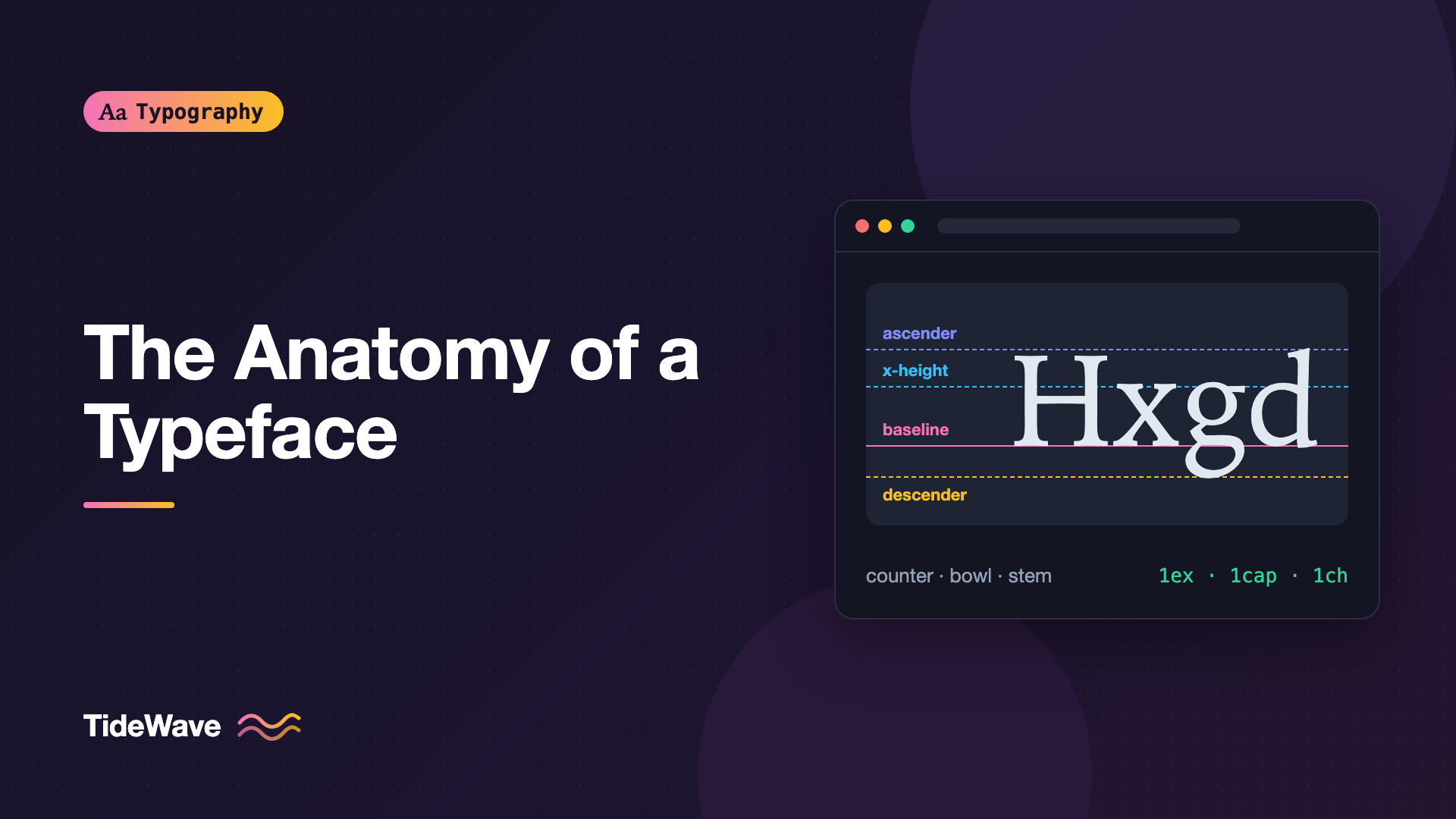
The Anatomy of a Typeface: Ascenders, Descenders, Counters, and More
- Maria
- Typography
- 23 Oct, 2026
You're comparing two sans-serif fonts for a product UI. They look almost identical at a glance, yet one feels cramped at 14px and the other reads comfortably. A designer on your team says the first one has "tight apertures and a small x-height." If those words mean nothing to you, the conversation stalls, and you end up picking fonts by gut feeling.
Letters have a well-established vocabulary, often called type anatomy. Every stroke, gap, and line in a glyph has a name, and most of those names describe something that directly affects how text looks and reads on screen. Learning them makes it easier to compare fonts, write better design feedback, and understand why CSS properties like line-height behave the way they do.
This guide walks through the vertical metrics that every font is built on, then the parts of individual letters, and finally how that anatomy maps to the decisions you make in CSS.
The Invisible Lines: Vertical Metrics
Before looking at individual letters, it helps to understand the horizontal lines that letters sit on and reach toward. Type designers draw every glyph relative to these lines, and fonts store several of them as numbers in the font file.
Baseline
The baseline is the line that most letters sit on. The bottom of x, n, H, and a all rest on it. When you align text from two different fonts in a single line, browsers line them up by their baselines, which is why mixed fonts in one paragraph still look like they belong on the same line.
Round letters like o and e actually dip slightly below the baseline. This is called overshoot, and it exists because a circle that only touches the baseline looks smaller than a square of the same height. The same trick happens at the top of round letters.
x-Height
The x-height is the height of lowercase letters without ascenders, measured from the baseline to the top of the x. It's one of the most important measurements in a font, because most of what you read is lowercase. Two fonts set at the same font-size can look dramatically different in size if their x-heights differ.
This topic has enough depth for its own article. See What Is x-Height and Why Does It Affect Readability? for how it affects legibility and how to compensate for it in CSS.
Cap Height
The cap height is the height of flat-topped capital letters like H and E. It's usually lower than the tallest ascenders in a font, which surprises people. In many typefaces the l and d reach above the top of the H.
Ascender and Descender Lines
The ascender line marks how high the tall parts of lowercase letters reach, and the descender line marks how far the hanging parts drop below the baseline. These two lines together define most of the vertical space a font needs.
Here's how the metrics compare:
| Metric | Measured from | Reference letters | Why it matters |
|---|---|---|---|
| Baseline | (reference line) | n, H, x | Aligns text across fonts |
| x-height | Baseline up | x, v, z | Perceived size of lowercase text |
| Cap height | Baseline up | H, E, T | Size of capitals, icons, and numerals |
| Ascender | Baseline up | b, d, h, l | Vertical space needed above text |
| Descender | Baseline down | g, p, q, y | Vertical space needed below text |
The Em Square
Every glyph is drawn on a grid called the em square (or em box). Its height is what font-size sets. If you write font-size: 20px, the em square is 20 pixels tall, but the letters inside it can be any size the designer chose. That's why font-size is a poor predictor of how big text actually looks. The visible letters are a fraction of the em, and that fraction varies by font.
Parts of the Letter
Now zoom in on individual glyphs. Not every font has every feature, and the exact shape of each part is a big part of what gives a typeface its character.
Stems, Bowls, and Bars
- Stem: the main vertical stroke of a letter, like the upright in
l,d, orH. Stem thickness is essentially what font weight changes. - Bowl: a curved stroke that encloses space, like the round part of
b,d,p, oro. - Crossbar (or bar): a horizontal stroke connecting two strokes, as in
HandA. The horizontal stroke ontandfthat only crosses the stem is often called a cross stroke. - Arm: a horizontal or diagonal stroke attached at one end only, like the top of
Tor the upper strokes ofE. - Leg: a downward stroke attached at one end, like the lower diagonal of
KorR. - Shoulder: the curved stroke coming off a stem, as in
n,m, andh.
Ascenders and Descenders
An ascender is the part of a lowercase letter that rises above the x-height: the tall stroke of b, d, f, h, k, l, and t. A descender is the part that drops below the baseline, as in g, j, p, q, and y.
Ascenders and descenders give words their distinctive outlines. Reading research has long discussed how readers recognize familiar word shapes, and while the exact mechanism is debated, it's uncontroversial that clear ascenders and descenders help letters stay distinct. Fonts with very short extenders can feel compact and modern, but they make similar letters easier to confuse at small sizes.
Counters and Apertures
A counter is the enclosed or partly enclosed space inside a letter. The inside of o is a closed counter. The space inside c or the lower part of e is an open counter.
The aperture is the opening of a partly enclosed counter: the gap in c, e, a, and s. Apertures are one of the biggest factors in small-size legibility:
- Open apertures keep
c,e, andodistinct even when blurred, rendered small, or viewed at a distance. Humanist sans-serifs tend to have them. - Closed apertures curl the stroke ends back toward each other. At small sizes or low contrast,
eandccan start to look likeo. Many grotesque and neo-grotesque designs have tighter apertures.
When someone says a font "holds up at small sizes," they usually mean it has generous x-height, open apertures, and large counters.
Serifs, Terminals, and Spurs
A serif is the small stroke at the end of a main stroke. Serif shapes range from thin and hairline (Didone faces) to heavy and blocky (slab serifs). For the bigger picture, see Serif vs Sans-Serif: How to Choose for Screen and Print.
A terminal is the end of a stroke that doesn't have a serif. Terminals can be cut straight, angled, rounded, or finished with a ball terminal, the round blob at the end of the arm in a, c, or r in many serif fonts. Terminal style is a subtle but strong personality signal.
A spur is a small projection, often at the bottom right of a G or b.
Ear, Link, and Loop
The double-story g has its own set of parts:
- Ear: the small stroke projecting from the top right of the upper bowl.
- Link: the short stroke connecting the upper bowl to the lower one.
- Loop: the lower enclosed part that hangs below the baseline.
A single-story g (like in many geometric sans-serifs) has a descender with a tail instead of a loop. Whether a font uses single- or double-story a and g changes its tone noticeably.
Stress and Contrast
Contrast is the difference between the thick and thin parts of strokes. Monoline fonts have almost no contrast; Didone fonts like Didot and Bodoni have extreme contrast.
Stress (or axis) is the direction of the thickening. Draw a line through the thinnest parts of an o. In old-style serifs that line tilts to the left, mimicking a broad-nib pen held at an angle. In Didone faces it's vertical. These differences are a core part of how fonts are classified, covered in Understanding Type Classification.
Spacing Anatomy
Letters also have anatomy you can't see directly: the space around them.
- Sidebearings: the space the designer builds into the left and right of each glyph. The glyph plus its sidebearings make up its advance width, the distance the cursor moves after drawing it.
- Kerning pairs: adjustments for specific letter combinations like
AV,To, orTy, where default sidebearings leave awkward gaps.
Good fonts have carefully balanced sidebearings and thousands of kerning pairs. Browsers apply kerning by default for most text, and you can control it with font-kerning:
body {
  font-kerning: auto; /* the default; browsers usually kern */
}

.code-sample {
  font-kerning: none;
}
How Anatomy Maps to CSS
Most of these concepts appear in CSS, sometimes under different names.
Font Metrics and line-height
When you set line-height, the browser takes the font's ascent and descent metrics (stored in the font file and not always the same as the drawn ascenders and descenders) and distributes the extra space above and below. This is why two fonts with the same line-height can look like they have different spacing, and why text sometimes looks off-center inside buttons.
CSS lets you override those metrics in @font-face:
@font-face {
  font-family: "Brand Sans";
  src: url("/fonts/brand-sans.woff2") format("woff2");
  font-display: swap;
  ascent-override: 92%;
  descent-override: 24%;
  line-gap-override: 0%;
}
These overrides are mostly used to make fallback fonts match web fonts and reduce layout shift.
Units Based on Anatomy
CSS has several units tied directly to type anatomy:
| Unit | Equal to | Typical use |
|---|---|---|
em | The element's font-size (the em square) | Spacing that scales with text |
ex | The font's x-height | Sizing inline icons to lowercase |
cap | The font's cap height | Aligning icons with capitals |
ch | The advance width of the 0 glyph | Line length, input widths |
lh | The element's computed line-height | Vertical rhythm |
.icon-inline {
  width: 1cap;
  height: 1cap;
  vertical-align: baseline;
}

.prose {
  max-width: 65ch;
}
The cap unit is newer than the others, so check browser support on caniuse before relying on it.
Matching x-Height Across Fonts
font-size-adjust uses the x-height ratio of a font to normalize the apparent size of text, which is especially helpful for fallbacks:
body {
  font-family: "Brand Sans", Arial, sans-serif;
  font-size-adjust: 0.52;
}
With this set, the browser scales whichever font is used so that its x-height equals 0.52 times the font-size.
Vertical Text Trimming
Because fonts reserve space for ascenders and descenders, a block of text has visible gaps above the cap height and below the baseline. The newer text-box property (with text-box-trim and text-box-edge) lets you trim that space to the cap height and baseline so text aligns precisely with icons and borders:
.button-label {
  text-box: trim-both cap alphabetic;
}
Support is still rolling out, so treat it as a progressive enhancement.
Using Anatomy to Compare Fonts
Once you know the vocabulary, you can evaluate a font in a minute or two. Set a test string that stresses the important parts, such as Hamburgefonstiv (a classic type specimen word) or il1I0O ceo agy, at the size you'll actually use. Then check:
- x-height relative to cap height. A larger ratio reads bigger at the same
font-size. - Apertures in
c,e,a,s. Open ones survive small sizes better. - Distinct
I,l, and1. Critical for UI, codes, and passwords. - Descender length. Short descenders allow tighter
line-heightbut can crowd. - Terminals and stress. These set the personality and tone.
Tip
Compare fonts at the same apparent size, not the same font-size value. Adjust one until the x-heights match, then judge spacing and shapes.
Common Mistakes
- Assuming
font-sizeequals letter height. It sets the em square, not the visible glyphs. Compare x-heights instead. - Confusing font metrics with drawn shapes. The ascent and descent values used for
line-heightcan differ from the actual ascenders and descenders, which is why text sometimes looks vertically off-center. - Ignoring apertures for small text. A beautiful display sans with closed apertures can turn labels at 12px into a blur.
- Judging fonts from a single word. Specimen headlines hide problems with
Il1,rnversusm, and descender collisions. Test real content. - Using
exandchas if they were constants. They change with the font, including when a fallback renders before the web font loads.
Conclusion
Type anatomy gives you a precise way to talk about letters: the baseline, x-height, cap height, and extenders that define vertical space, and the stems, bowls, counters, apertures, and terminals that define each glyph's shape. Most of these terms describe features that directly affect legibility, especially at small sizes.
The practical takeaway is to look at fonts with that vocabulary in mind. Check x-height and apertures before picking a UI font, use units like ex, cap, and ch when you want sizing tied to the letters themselves, and remember that font-size measures the box, not the glyph.


